Monalina Girl: A Delicate Script Font for Web Design Projects
Finding the Perfect Script Font for Digital Branding
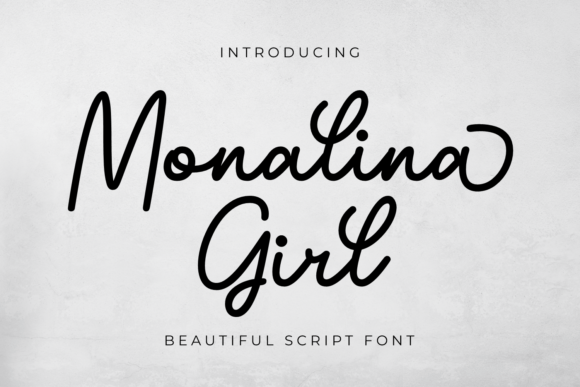
As a web designer, I'm always on the lookout for fonts that add personality without sacrificing usability. Recently, I tested Monalina Girl on a boutique wellness website redesign, and I was curious to see how this delicate script would hold up in a digital environment. With its soft curves and elegant strokes, Monalina Girl immediately stood out as a premium script font that could elevate a brand’s visual identity.
I placed it in the hero section of a homepage, overlaying it on a soft watercolor background. The font’s light weight and open spacing made it surprisingly legible, even at a medium size. It gave the brand a feminine, approachable feel—perfect for a holistic coaching site. But I wanted to test it further before recommending it for more projects.
Testing Monalina Girl in Real Web Layouts
Next, I used Monalina Girl in a landing page headline for a new digital course launch. The font’s flowing lines added a sense of movement and warmth, making the header feel more human and less corporate. I paired it with a clean sans serif for body text, which created a nice visual contrast and kept the layout balanced.
I also tested it across devices. On desktop, it looked beautiful—soft and elegant. On mobile, I slightly increased the font size and adjusted the letter spacing to ensure readability. It held up well, especially as a display font in hero sections and call-to-action headers. However, I noticed that at smaller sizes—like in navigation menus or form labels—the fine strokes began to blur, making it less ideal for those uses.
Using Monalina Girl for Brand Identity and Web Graphics
One of the strongest applications I found for Monalina Girl was in logo design and branded graphics. I used it to create a custom logo for a creative portfolio site, and it gave the brand a soft, artistic edge. It also worked beautifully in social media graphics and promotional banners, where its decorative nature could shine without interfering with usability.
I particularly liked how it looked in a hero image overlay—light, airy, and modern. For a boutique online store I was helping design, I used it in the homepage banner with a semi-transparent overlay behind the text. It maintained clarity and added a touch of elegance without being overwhelming.
Readability and Responsive Design Considerations
While Monalina Girl is a beautiful script font, it’s important to use it thoughtfully. Due to its decorative nature and thin strokes, it doesn’t perform well in small sizes or in environments with low contrast. For example, using it on a dark background without proper spacing or a light stroke outline can make it difficult to read.
When designing for accessibility, I recommend using Monalina Girl only for short, impactful text like headlines, logo text, or featured quotes. Avoid using it for long paragraphs, navigation labels, or any area where clarity is critical. Also, make sure to test it on multiple devices and screen resolutions to ensure consistent rendering.
Font Pairing for Web Design
One of the best things about Monalina Girl is how well it pairs with clean, minimalist fonts. I used it alongside Montserrat and Lato in several projects, and the contrast worked beautifully. The script font brought warmth and personality, while the sans serif kept the layout modern and easy to read.
For more editorial-style websites, pairing Monalina Girl with a classic serif like Playfair Display can create a luxurious, curated feel. Just be sure to balance the visual weight—use the script font sparingly to avoid overwhelming the layout.
Final Thoughts on Using Monalina Girl in Web Design
Monalina Girl is a versatile display font that works best when used intentionally. It’s perfect for headlines, logo design, hero sections, and branding elements where you want to evoke a soft, elegant aesthetic. However, due to its delicate strokes and script style, it’s not ideal for small text or long-form content.
Before using Monalina Girl in a client project or personal site, make sure to check the webfont availability, file formats, and licensing. It’s also a good idea to preview the font in different environments—light and dark backgrounds, mobile and desktop—to ensure optimal performance.
If you're looking for a script font that brings a touch of sophistication to your web design without being too ornate, Monalina Girl is definitely worth testing in your next layout. Just remember to use it where it shines brightest—large, impactful text that supports your brand’s emotional appeal and visual storytelling.